


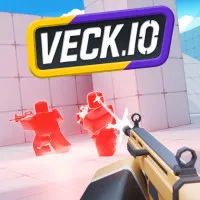
Veck IO








Veck IO is a fast-paced multiplayer FPS game where every second can decide the outcome of a match. You will enter neon-style 3D arenas, constantly moving, jumping, sliding, and switching weapons to gain an advantage over your opponents. Are you ready to choose your favorite mode, master the movement speed, and climb the leaderboards? Play and enter the battle now!
Veck IO: Fight With More Than 40 Different Weapons
In Veck IO, you will join online FPS matches taking place in multi-level arenas designed for continuous movement. Instead of standing still and waiting for opponents to appear, players need to use the surrounding space to change positions, dodge attacks, and find better angles for attacking.
The movement system is an important part of the gameplay. You can run through different areas, jump around corners, slide across the ground, or quickly change direction during combat. Maintaining your speed helps you approach targets and makes it harder for opponents to predict your next position.
Veck.io offers more than 40 types of weapons, from paintball guns, SMGs, burst rifles, and shotguns to snipers, launchers, and heavy weapons. Each type has a different way of being used, so choosing the right weapon for the distance and situation can help you control the match more effectively.
Key game modes
- Arcade Mode: An easy-to-access mode that lets you quickly choose your equipment and enter the match.
- 1v1, 2v2, 3v3, and 4v4: Matches with different team sizes, from direct one-on-one battles to larger team fights.
- Gun Game: Each time you defeat an opponent, you will switch to a different weapon.
- Private Rooms: Create private rooms to play with friends, practice, or organize small matches your own way.
- Global Leaderboards: Your match performance is used to compete on the global leaderboards, creating an additional goal for players who want to improve their results.
Game controls
- WASD: Move.
- Space: Jump.
- Shift or C: Slide.
- Right-click or E: Aim accurately (ADS).
- Left Click: Shoot.
- Enter: Open chat.
- P or Esc: Pause.
Action games you might like